Input pit
- Data import
Other than pit and
Kanabis offers attitude-wise construction of duct systems the possibility of
reading complete nets in from existing file formats.
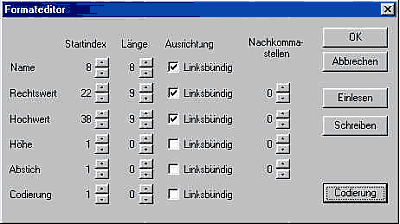
In Projekt => Aufbauen following menu options are
offered:
- Kanal++: direct assumption of the
net data from the hydraulic package of Pecher software.
- C: here we transfer the
coordinates of the foundation engineering planning system C in the format of
the version 7.0 as ASCII (= points) - and POLE (= lines) file
- Free format: permits reading in
coordinates at will formatted. An only condition: the coordinates must be
arranged in columns.
- ISYBAU K: this is a
producer-independent ASCII format to the transport of situation-referred
channel data and supplies complete, three-dimensional duct systems with cover
and resoling heights, tubing dimension and material.
- DXF: If you got a DXF plan on disk
from the client, you can deposit these in Kanabis. They select under Ansichten
=> Background-Images the path of the DXF file out and the digital design in
the net film gate one represents. Now you have to set the possibility by means
of pit/newabsolute into the existing pit symbols of the DXF design new kana
until pits. The position coordinates are produced automatically thereby, cover
and resoling heights must take and into the pit mask register you out of the
plan texts.
- Konstruktion
Other than the
fast and rational assumption of finished duct systems from data files and the
pit-wise digitization of DXF pictures the editor can at any time enter further
pits and attitudes by hand or change existing pits in their situation
constructionally.
In addition the following possibilities are offered
- absolutely: The pit set by mouse-click in
the window net picture freely on the screen and/or with deposited DXF picture
on the indicated pit symbol. Opening the input mask permits the correction of
the indicated situation and elevator data. Kind and function of the pit can be
changed in the appropriate boxes function and condition.
- polar: The pit is specified by polar
construction. In addition an already existing pit is selected as point of view,
afterwards a further pit than goal. Related to this output direction the new
pit with distance and angle is again entered. From a point of view as many as
desired points of pit can again be designed in consequence.
- orthogonal: An already existing pit is
selected as point of view, a further pit than goal. Related to this base line
the new pit with abscissa (= distance in the messlinie) and ordinate (lateral
moving away measure) is specified. This procedure can arbitrarily often be
repeated with the same base line.
- Circle-Circle: This type of construction
predominantly comes during the definition from annexes to the employment. The
again built annexe whether visible pit or open piping end, in-measured by elbow
impact on the neighbouring pits of the forward channel. The clamping mass from
the air passage sheet stand for point construction for order. Two circles are
struck with the clamping masses around the attitude pits and brought with one
another to the cut. One of the two offered solutions by mouse-click selected
and it opens the pit mask to the further Bearbeitug. Will indicated the
computed coordinates, cover and resoling height of the annexe can be entered
and the editors decides whether it concerns around a normal or an annexe pit, a
current or fictitious (= open piping end) pit. These data are compelling, in
order to specify the future behavior of the new pit in diagram and account.
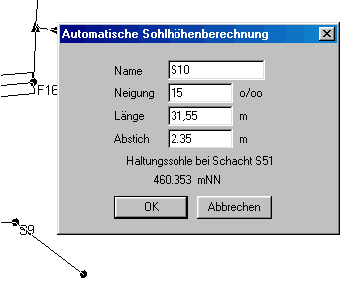
- Pit and attitude set: This is the
outlining mode of Kanabis, thus in fast order attitude for attitude a duct
system is outlined. Pits and attitudes are set in a processing step on the
screen, the necessary input data such as pit name, inclination and length of
the attitude as well as depth of the new pit (= tap) ask the following input
mask off. The absolute situation of the net is only approximately
seized.
|
|