New project
- Data => New
At Menu in Datei =>
Neu
New: A new project is provided. This function corresponds to the
Button "NEW" on your menu border. KANABIS puts on a new project for you. In
addition you must make some inputs in the following project mask:
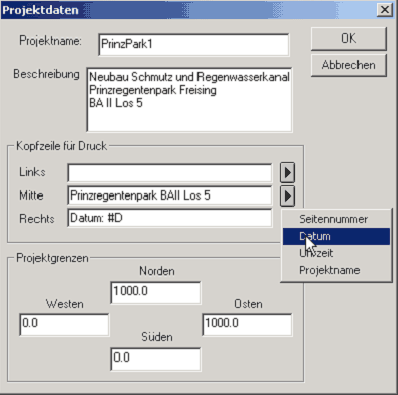
A project name must be assigned. Here apply the
old MS-DOS conventions, thus no call or asking characters, no hyphens or blanks
use. The name entered here designates those * kan file. The description shows
somewhat longer information to the project and appears only on the first page
of the account. The headline for the pressure contains short info. and on each
sheet of minutes is printed. The project borders do not have to be filled out,
them serve only the information. They adapt to the read in data automatically.
Please you confirm the inputs with OK ONE, breaking off make possible a
re-entry. If they confirm with OK ONE, the reference horizon appears as next
mask.
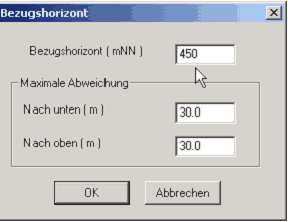 For the altitude of the
project the framework data are entered here. Are sufficient round pack of 10 -
values with the height, which knows maximum deviation down the local conditions
is upward and adapted. From the inputs an elevator passage results, within
whose elevator inputs are accepted. Everything which outside is appropriate,
rejected. For the altitude of the
project the framework data are entered here. Are sufficient round pack of 10 -
values with the height, which knows maximum deviation down the local conditions
is upward and adapted. From the inputs an elevator passage results, within
whose elevator inputs are accepted. Everything which outside is appropriate,
rejected.
If this mask is confirmed, appears the empty, four-divided
kana until screen, which you can maximize with the Windows function on the top
right on full size.
|
|