Edit bearing
At Menu in Haltung => öffnen /
ändern
As soon as net geometry, which LV and all necessary
construction units are seized such as pipes, shaft elements, supports and
sheeting, one can go to working on a sample attitude. They select in
addition arbitrary attitudes from the total net and open these with attitude
open. Then they change by mouse-click into the profile.
The sample
attitude defines itself by its characteristic layer structure at the
surface with specific widths e.g. for humus erosion, bitumen departure or
freeze protection gravel and the associated LV positions. In addition as
required also an underground improvement belongs under the pipe and/or
supports, furthermore the excavation and filling positions of the channel ditch
as well as the tubing zone than combination made of pipe, support and
cover.
- LV => Read
At Menü in LV =>
Lesen
Flexible collection of bills of quantities (LV's) over
different GAEB -OEORM and ASCII of formats
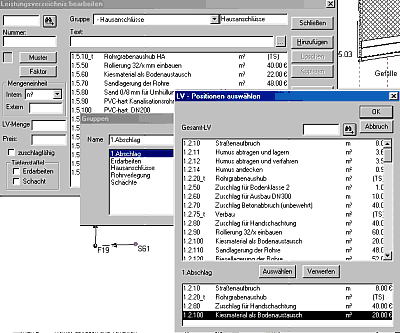
- LV => Edit => Groups
The
LV (Contract Document) titles are taken over under groups and can be edited and
supplemented there. Also contents of individual LV groups can know worked on
and/or new groups to be formed. That is meaningful in particular if the read in
LV is unclear and badly structured. They arrange themselves then their own LV
groups and remove the redundant radical from the LV. It is your work time,
which you vergaeuden by long Herumsuchen in badly arranged LV's.
At a LV
group also LV positions can be summarized, which are to be accounted for
positively. That concerns in particular the case that you already prepared the
account in the apron completely and attitudes, pipes, pits etc.. with positions
occupied, which are to date still not at all implemented. They do not want to
waive and select these assignments however any longer under LV group only
positions out, which are also abrechenbar at the time of the
pressure.
- Pipes
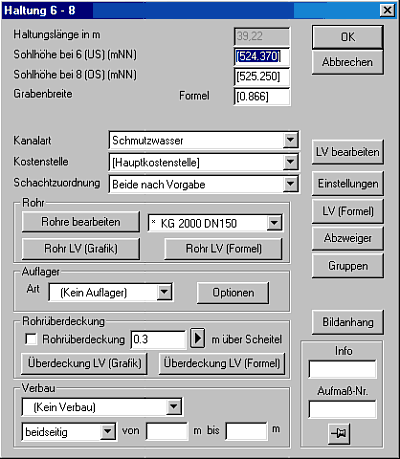
At Menu in Haltung => Ändern
=> Rohre
At the mask attitude will change a pipe assigned,
which was produced for one or more LV positions before under installation =>
pipes and/or attitude => pipes and occupied with for the opened
attitude.
Graphically only one pipe can be assigned to an attitude,
non-graphically however as much as desired. The agreed upon pipes can be
changed at any time in form and condition. The program reacted immediately and
changes support strength, excavation depth and ditch width.
- Bearing
At Menu in Haltung => Ändern
=> Rohre => Ändern => Auflager
Kanabis offers
under installation => supports and/or attitude => to supports
prefabricated all after support types before Mali towards DIN the 4033 and/or
the current DIN/EN 1610 for the selection. The supports can be linked similarly
the pipes over changing => LV(Grafik) / LV(Formel) with LV positions. Apart
from the standard sizes such as width and height individual attitudes can be
made and along-copied.
- Tubing Cover
At Menu in Haltung => Ändern
=> Rohre => Ändern => Rohrüberdeckung
The
tubing cover is assigned under attitude => changing => tubing cover. The
cover strength over pipe is pre-occupied with 30cm, can be changed however
global (= project far) or locally (= limited on single attitude).
- Gontract specifications (Formel)
At Menu in Haltung => Ändern
=> Rohre => Ändern => Rohrüberdeckung
In this
menu option all not-graphic positions can be assigned to an attitude. Example:
Public works with several coworkers and machines are seized by item, a drainage
line, which is not to be accounted for over the haltungslaenge, but be
indicated in the diagram. Or a leak test or a camera driving on, which goes
with the attitude length and cannot therefore to the pipe be hung.
- Area
The term area designates a
three-dimensional earth body, which is to be seen with opened attitude in the
along and in the cross section window within an attitude. The width of the area
regulates the preset width regulation (- pre-setting => attitude ditch =>
ditch width), in the length limits it the two pit axles, in the height the area
line and the attitude sole.
The area is equipped over the function area
=> to change => LV(Grafik) with or as many as desired LV
positions.
The worked on area is changeable in its width. In addition
you can access widths, which agreed upon you under pre-setting => area
widths => ditch/custom-form widths global. The ditch widths understand
themselves as Zuschlaege to given rule width. They regulate for example the
back cut with Bituaufbruch or the building field width. In contrast to it the
custom-form widths absolute width impacts are also asymmetrically, for example
one-sided to the rule ditch and can be agreed upon as stage ditch.
The
excavation position is assigned to the appropriate earth body over the function
area => to change => LV(Grafik) in the Layer
excavation.
Grafik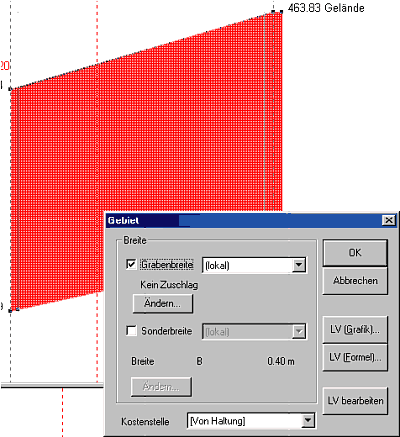
The filling
position is assigned to the appropriate earth body over the function area =>
change => LV(Grafik) in the Layer installation. The displacement is
considered automatically by the respective installations (pipe, support, pit
and cover).
The partitioning of attitude/areas into individual layers is
possible. Working on window is the profile. The layer structure at the surface
of an attitude produced by unique or repeated copying of the surface line. They
use for it the functions line/line-course/marked lines copy under the menu
option line. The original line can be deleted after copying, if it is not any
longer used. At the surface we recommend to delete the original line not to
maintain but even if the again produced area without position assignment should
remain. The again produced area afterwards worked on with area change.
|
|